- Vehicles
- Small & Midsize Rental Cars in Iceland
- Family Rental Cars in Iceland
- Electric
- 4x4 Car Rental in Iceland
- Suzuki Jimny 4x4
- Dacia Duster 4x4
- Suzuki Vitara 4x4
- Suzuki Vitara auto 4x4
- Dacia Bigster 4x4
- Kia Sportage 4x4 Auto
- Kia Sportage PHEV 4x4 auto
- Mitsubishi Outlander PHEV 4x4 auto
- Toyota Rav4 4x4 auto
- Kia Sorento 4x4 auto
- Mercedes Benz 350 GLE PHEV 4x4 auto
- Toyota Landcruiser 150 4x4 auto
- Toyota Landcruiser 250 4x4 auto
- Landrover Discovery 5 4x4 auto
- Landrover Defender 4x4 auto
- Prestige
- Rent a Minivan in Iceland
- 4x4 Camper
- Motorhomes
- Driving in Iceland
- Services
- Locations
- Travel Inspiration
- South Iceland: A complete guide
- Reynisfjara Beach in Iceland - Your Guide to a Safe Visit
- Best Times to Visit the Golden Circle in Iceland
- North Iceland: A Complete Guide for Drivers
- East Iceland A Complete Guide for Drivers
- West Iceland The Complete Driver’s Guide
- Your Ultimate Guide to Exploring Iceland’s Ring Road
- Driving the Diamond Circle in Iceland: Your Ultimate Guide
- Driving Iceland's Golden Circle: Your Ultimate Guide
- A 10-Day Itinerary in Iceland: Tips + Ideas
- The Perfect Itinerary for 7 Days in Iceland
- The Best Time to See the Northern Lights in Iceland with a Rental Car
- Renting a Camper in Iceland: The Complete Guide
- Getting to Iceland: A Comprehensive Guide on How to Reach the Land of Fire and Ice
- Nature Bath Locations in Iceland: A Complete Guide
- Iceland with Kids: A 5-Day Self-Drive Itinerary
- Winter Driving in Iceland: A Comprehensive Overview for Foreign Tourists
- The Total Solar Eclipse in Iceland – August 12, 2026
- Exploring Iceland's National Parks on a Self-Drive Adventure
- Exploring Iceland's Wonders: A Comprehensive Guide to Activities and Car Rentals
- Springtime in Iceland – Your Comprehensive Travel Guide
- Exploring Iceland's Most Popular Highland Routes
- The Pearls of Westfjords: The Ultimate Guide
- Exploring Iceland's Hidden Gems | Off-the-Beaten-Path Adventures
- Driving in Iceland in June: Tips for a Safe and Scenic Summer Road Trip
- Driving in Iceland in July: Tips, Routes & Rentals
- Driving in Iceland in August: Late-Summer Freedom on the Open Road
- Guide to Skaftafell Iceland Self-Drive A Journey Through Fire and Ice
- Eco-Friendly Road Trips in Iceland, Sustainable Travel Tips
- Photographer’s Paradise Top Scenic Drives in Iceland for Stunning Shots
- Iceland's Folklore and Legends A Road Trip Through Mythical Sites
- Iceland’s Midnight Sun and How to Make the Most of 24-Hour Daylight
- Exploring Iceland’s Viking Heritage: Top Historical Sites
- Chasing Waterfalls: A Road Trip to Iceland’s Most Spectacular Cascades
- Iceland's Volcanic Wonders: A Self-Drive Tour of Active and Dormant Volcanoes
- Tee Off in the Land of Fire and Ice: A Guide to Golfing in Iceland
- Birdwatching in Iceland: Puffins and Beyond
- Iceland’s Diverse Beaches: Beyond the Black Sands
- Icelandic Horses: The Unique Breed of the North
- Beyond the Ring Road: Iceland’s Hidden Scenic Drives
- Iceland’s Ice Caves: A Year-Round Adventure
- Wildlife Watching in Iceland: Where and When to Go
- Iceland’s Hidden Hot Springs: A Self-Drive Guide to Secret Soaks
- Navigating Iceland’s Weather: What to Expect Each Season
- Tröllaskagi Peninsula: Iceland’s Mountainous Marvel — A Scenic Road Trip with Höldur
- Mastering Iceland's Roundabouts: A Driver’s Guide
- Essential Tips for Renting a Car in Iceland
- Navigating Iceland’s One-Lane Bridges: Your Guide to Safe and Scenic Crossings
- Exploring Iceland’s Film Locations by Rental Car
- 5 Must-Visit Destinations Within Two Hours of Keflavík Airport
- Seasonal Car Rental Tips for Iceland’s Summer Festivals
- Understanding Iceland's F-Roads: How to Drive Safely Into the Highlands
- What Makes Iceland Unique: Top 15 Highlights for an Unforgettable Journey
- Driving and Hiking in Harmony: Explore Iceland's Natural Wonders with Höldur Car Rental
- Best Car to Rent in Iceland?
- Avoiding Common Car Rental Mistakes in Iceland
- Making Your Car Rental in Iceland Child-Friendly: Tips for Stress-Free Family Travel
- Exploring Akureyri, Iceland’s Northern Gem, with EasyJet and Europcar
- Renting a Manual or Automatic Car in Iceland
- Discover the Arctic Coast Way in Iceland with Höldur Car Rental
- How to Save on Fuel Costs During Your Iceland Road Trip
- Electric vs. 4x4 Rentals in Iceland: Which is Right for Your Trip?
- Top Scenic Detours Off Iceland's Ring Road
- Top Safety Tips for First-Time Drivers on Iceland’s Roads
- Cultural Pit Stops Along Iceland’s Ring Road
- Your Guide to Exploring Stuðlagil Canyon by Car: Iceland’s Basalt Beauty Awaits
- Day Trip Ideas From Reykjavik by Rental Car
- Visit Glymur Waterfall: The Ultimate Self-Drive Adventure from Reykjavík
- Discover the Volcanic Wonders of Lake Mývatn by Car
- Discovering the Magic of Snæfellsnes Peninsula by Car
- Your Self‑Drive Guide to Gullfoss Waterfall
- A Guide to Seljalandsfoss Waterfall in Iceland: Explore by Car
- Exploring Reykjanes Peninsula A Self Drive Guide
- Exploring Iceland Landmannalaugar by 4x4
- A Beginner's Guide to River Crossings in Iceland
- Best Car Rental Offers for Iceland’s Summer Adventures
- Your Self‑Drive Guide to Þingvellir National Park
- Your Ultimate Guide to Geysir, Iceland: All You Need to Know
- How to Pay for the Vaðlaheiðargöng Tunnel
- Your Guide to Visiting Jökulsárlón Glacier Lagoon
- The Diamond Beach in Iceland: A Sparkling Wonder Worth Visiting
- Parking fines in Iceland: how to pay and what to do if you receive one
- Where to find overnight parking in Reykjavík: a local’s guide for travellers
- How to park for free in Reykjavík: tips to save on your Iceland trip
- How to pay for parking in Reykjavík - A friendly guide for drivers in Iceland
- Game of Thrones Filming Locations in Iceland: A Self-Drive Guide
- How to Choose the Right Car Rental at Keflavík Airport
- Flying Within Iceland: Your Guide to Domestic Routes and Regional Airports
- Top 3 Must-See Attractions on Iceland's Golden Circle
- Hidden Gems Along the Golden Circle Route
- Your Essential Guide to Iceland: Currency, Culture, and Car Rental Tips
- How to Plan the Perfect Golden Circle Self-Drive Tour
- The Comprehensive Guide to Rental Car Sizes at Keflavik Airport
- Húsafell & Hallmundarhraun: Hidden Lava Field Adventures by Car
- Iceland Weather by Month: What to Expect and How to Drive Safely with Holdur Car Rental
- A Guide to Iceland’s Quirky Roadside Attractions
- Exploring Iceland’s Lava Tubes | Self-Drive Cave Adventures with Höldur Car Rental
- Coolcation in Iceland: Self-Drive Your Summer Escape to the North
- Driving Iceland’s Coastal Roads: A Guide to Lesser-Known Peninsulas
- Top Tips for Driving in Iceland Safely Year-Round
- The Best Rest Stops and Viewpoints Along Iceland's Ring Road
- Driving in Iceland in September: Embrace the Autumn Adventure
- Your Guide to Exploring Fjaðrárgljúfur – South Iceland’s Fairytale Canyon
- Explore Reykholt on a Self-Drive Tour in Iceland
- How to Choose the Right Insurance for Your Iceland Car Rental
- Hiking Múlagljúfur Canyon: Iceland’s Hidden Gem You Can’t Miss
- Understanding Iceland's Weather and How It Affects Driving Conditions
- Dyrhólaey: A Complete Self-Drive Guide to Iceland's Breathtaking South Coast
- Where to See Iceland’s Tectonic Plates Up Close
- Scenic Journey on Kjalvegur Road 35 Reykjavik to Akureyri
- Guide to Visiting Svartifoss with a Rental Car
- Kerið Crater Lake in Iceland: A Self-Drive Guide
- Your Complete Guide to Stokksnes, Iceland with a Rental Car
- Hengifoss Waterfall in Iceland: The Ultimate Self-Drive Guide
- Your Complete Guide to Visiting Skógafoss Waterfall with a Rental Car
- Into the Heart of Þórsmörk: Iceland’s Valley of Thunder
- Dynjandi Waterfall in Iceland: The Ultimate Self-Drive Guide
- Visiting Ásbyrgi Canyon in North Iceland by Car: A Complete Self-Drive Guide
- Driving in Iceland in October: Embrace the Autumn Transition
- Hraunfossar: Iceland’s Hidden Gem for Self-Drive Travellers
- Barnafoss Waterfall: Iceland’s Raging Cascade with a Legend
- Driving in Iceland in November: Your Complete Guide to a Spectacular Autumn Adventure
- Fishing in Iceland: All You Need to Know
- Öxarárfoss Waterfall in Iceland: A Self-Drive Guide with Höldur
- Life in Iceland: Essential Guide to Living in the Land of Fire and Ice
- People of Iceland - 12 Fun Facts About Icelanders
- Glaumbær Turf Houses: A Self-Drive Guide to Iceland’s Living History
- Húsavík: Whale Watching Capital of Iceland
- Svínafellsjökull Glacier: A Self-Drive Guide to Iceland’s Ice Giants
- Kirkjubæjarklaustur: A Historic South Coast Gem
- Vík í Mýrdal: South Iceland’s Coastal Treasure
- Namaskard: A Self-Drive Guide to Iceland’s Geothermal Wonderland
- Laufás Heritage Site: Where Iceland’s Past Lives On
- Navigating Iceland's Gravel Roads: Tips for a Safe and Smooth Drive
- Iceland's Best Stargazing Spots for Self-Drive Travellers
- Iceland's Best Picnic Spots: Scenic Stops for Self-Drive Adventures
- Top 5 Family-Friendly Hiking Trails Accessible by Rental Car
- 15 Tips for Travelling to Iceland
- How to Plan a Winter Photography Road Trip in Iceland
- Visiting Gljúfrabúi Waterfall — A Self-Drive Guide
- How to Spot Puffins in Iceland: A Self-Drive Adventure
- Your Essential Guide to Winter Tyres and Safe Driving in Iceland
- Iceland’s Most Active Volcanoes: A Self-Drive Guide
- Iceland’s Most Scenic Bridges and River Crossings: A Self-Drive Guide
- Iceland’s Most Instagrammable Spots for Self-Drive Travellers
- How Cold Is It in Iceland During Winter? A Self-Drive Guide
- Explore Dimmuborgir: A Self-Drive Guide to Iceland's Dark Castles
- The Ultimate Guide to Iceland’s Top 5 Waterfalls by Car
- Iceland’s Best Scenic Routes for Autumn Foliage: A Self-Drive Guide
- The Best Time to Visit Iceland for Self-Drive Travellers
- Self-Drive Adventures to Iceland’s Remote Lighthouses
- Selfoss Waterfall Self-Drive Guide: Explore Iceland Your Way
- All About the Icelandic Sheep
- Vestrahorn: A Self-Drive Guide to Iceland’s Stokksnes Peninsula
- Höfn, Iceland: The Lobster Town Self-Drive Guide
- Exploring Arnarstapi: A Self-Drive Guide
- A Guide to Iceland's Seasonal Foods for Your Road Trip
- Hverfjall Crater, Iceland: A Self-Drive Guide
- Self-Drive Guide to Visiting Askja
- A Self-Drive Guide to Visiting Kerlingarfjöll
- A Self-Drive Guide to Gunnuhver Geothermal Area
- Skriduklaustur, Iceland: A Self-Drive Guide to History & Culture
- Your Ultimate Guide to Visiting the Blue Lagoon in Iceland
- Borgarnes, Iceland: Top Things to Do & Self-Drive Guide
- A Guide to Glaciers in Iceland
- Car Rental Insurance in Iceland: What’s Usually Included, What’s Not & How to Choose
- Best Car Models for Iceland’s Terrain: Recommendations by Route
- Solo Traveller’s Guide to Self-Driving in Iceland
- Exploring Iceland’s Arctic Circle: What to See and Do
- How to Plan a Budget-Friendly Road Trip in Iceland
- The History of Iceland’s National Day: A Self-Drive Celebration
- Where to Spot Whales in Iceland: A Self-Drive Guide
- The Diamond Circle vs. The Golden Circle: Which Route is Right for You?
- Embracing a Greener Journey: Sustainability in Iceland
- Granni: A Self-Drive Guide to Iceland’s Neighboring Waterfall
- Háifoss: A Self-Drive Guide to Iceland’s Tallest Waterfall
- Iceland's Best Camping Spots for Road Trippers
- Gjáin: A Self-Drive Guide to Iceland’s Hidden Oasis
- Iceland's Hidden Waterfalls: Beyond the Tourist Trails
- Hjálparfoss: A Self-Drive Guide to Iceland’s Helping Falls
- Seasonal Self-Drive Itineraries in Iceland: What’s Open When?
- Kirkjufell: A Self-Drive Guide to Iceland’s Most Photographed Mountain
- Fjallabak Nature Reserve: A Self-Drive Guide to Iceland’s Rugged Highlands
- Hrafntinnusker: A Self-Drive and Hiking Guide to Iceland’s Obsidian Wilderness
- When to Visit Iceland: Northern Lights and Ice Caves vs. Hiking and Highland Adventures
- Visiting Laugarvatn Fontana Spa with a Rental Car: A Relaxing Icelandic Getaway
- Hvítserkur Rock: A Self-Drive Guide to Iceland’s Dragon of the North
- Skiing in Iceland: A Self-Drive Guide for Winter Adventurers
- Visiting the Mývatn Nature Baths by Car: A Self-Drive Guide
- Visiting Vök Baths in East Iceland: A Self-Drive Guide
- Visiting Skútustaðir Pseudo-Craters: A Self-Drive Guide
- Visiting Hljóðaklettar: A Self-Drive Guide on the Diamond Circle
- The Ultimate Guide to Exploring Reykjavik with a Rental Car
- Visiting Seljavallalaug: A Hidden Gem in South Iceland
- Guide to Sólheimajökull Glacier by Iceland Car Rental
- Eyjafjallajökull: Iceland’s Glacier Volcano
- Ísafjörður, Iceland: Your Ultimate Self-Drive Guide to the Westfjords
- What Continent is Iceland In? A Traveler's Guide
- Katla Volcano: A Guide to Iceland's Sleeping Giant
- The Magic of Icelandic Water: A Traveler's Guide
- A Guide to Exploring Akureyri by Rental Car
- A Self-Drive Guide to the Krafla Volcanic Region
- 12-Day Iceland Self-Drive: The Complete Itinerary
- Hekla Volcano: A Self-Drive Guide to Iceland's Gateway
- Visiting Deildartunguhver: A Self-Drive Guide to Europe’s Most Powerful Hot Spring
- Exploring Borgarfjörður: A Self-Drive Guide to West Iceland
- Exploring Stórurð: A Self-Drive and Hiking Guide to East Iceland
- Visiting the Forest Lagoon in North Iceland: A Self-Drive Guide
- Driving in Iceland in December: Embrace the Winter Wonderland
- Exploring Grábrók: A Self-Drive Guide to Iceland’s Volcanic Crater
- Exploring Látrabjarg: A Self-Drive Guide to Iceland’s Westernmost Point
- Iceland Car Hire Tips for UK Drivers: What You Need to Know
- 4-Day Iceland Winter Itinerary: The Best of the South
- Mount Mælifell: Iceland’s Emerald Volcano
- How Long to Drive Around Iceland? A Self-Drive Guide
- Driving in Iceland in January
- Exploring Djúpavík: A Self-Drive Guide to Iceland’s Remote Westfjords
- What to Wear in Iceland: Tips for Every Season
- Things to Do in Stykkishólmur: A Self-Drive Adventure Through Iceland’s Magical West
- The Secret Lagoon: Iceland’s Hidden Gem of Relaxation and Discovery
- The Silver Circle of Borgarfjörður: Your Ultimate Self-Drive Guide
- Snæfellsjökull: A Journey to Iceland’s Glacier of Legends
- Car Rental Iceland 4x4: Best 4WD Options for Your Trip
- What to See in Iceland: 20 Places You Don’t Want to Miss
- How to Prepare for an Iceland Road Trip
- Your Guide to Visiting Fagrifoss Waterfall by Car
- Exploring Stakkholtsgjá Canyon: A Self-Drive Adventure in Iceland
- Kolugljúfur Canyon: A Guide to Iceland's Hidden Gem
- Exploring Kvernufoss: A Hidden Gem in South Iceland
- Skógar Museum: A Journey Through Iceland's History
- 2 Days in Iceland: The Perfect Itinerary
- Exploring Berserkjahraun: A Self-Drive Guide to Iceland’s Lava Fields
- Driving in Iceland in February: Your Complete Guide
- Iceland Daylight Hours by Month: Planning Your Trip
- Petra’s Stone Collection: A Self-Drive Gem in East Iceland
- Iceland's New Kilometer-Based Road Tax: Everything You Need to Know
- Krýsuvíkurbjarg Cliffs: Self-Drive Guide to Iceland’s Wild Coast
- Brimketill: The Reykjanes Peninsula’s Natural Lava Pool
- Exploring Eldhraun Lava Field: A Self-Drive Guide to Iceland’s Volcanic Marvel
- Iceland 2026 Car Rental Guide
- Choosing the Best 4x4 for Iceland's Westfjords
- How Sagas and History Shape Iceland's Driving Routes
- Driving in Iceland After Dark: How to Plan Safe Evening & Night Drives
- What to Do When Roads Close in Iceland: A Traveller’s Plan B Guide
- Iceland With a 2WD Only: No‑Gravel, No F‑Road Itineraries
- Iceland Through the Windshield: Landscapes You’ll See Without Leaving the Car
- Iceland EV Road Trips Made Easy (2026 Guide)
- Iceland Speed Cameras & Fines: The 2026 Driver’s Guide for Visitors
- 24 Hours in Iceland (KEF Layover): Two Seasonal Micro-Itineraries by Car
- Self-Drive Iceland for First-Timers: A Realistic Day-by-Day Pace Guide
- The Complete Self-Drive Guide to Fjallsárlón Glacier Lagoon
- Route 60 Westfjords Road Trip: Dynjandi, Þingeyri & New Tunnels Explained
- Baldur Ferry With a Rental Car: Stykkishólmur ↔ Brjánslækur
- Iceland at Easter: 5‑Day Self‑Drive Itinerary from KEF
- Westman Islands by Rental Car + Ferry: Day Trip from the South Coast
- Reykjavík Northern Lights Pull-Outs: Safe Self-Drive Spots within 45 Minutes of the Capital
- Staying Connected: Best SIM Cards and Wi-Fi Options for Your Iceland Road Trip
- The "Gas & Go" Logistics Guide: How to Pay for Gas in Iceland Without Getting Stranded
- Iceland Wind Guide for Drivers
- Fjallsárlón vs Jökulsárlón: Which Glacier Lagoon to Visit by Car?
- Iceland Road Conditions by Region (What to Expect Beyond Weather)
- Iceland’s Best Scenic Loops
- Iceland for Everyone: Accessible Natural Wonders by Car
- Iceland’s Most Photogenic Churches: A Scenic Architectural Drive
- Driving in Iceland in March: Weather, Daylight & Safe Itineraries (2026)
- Go / No-Go: A Driver’s Playbook for Using Road.is, Veður & SafeTravel Before You Set Off
- How to Plan a 3-Day Self-Drive Adventure in Iceland’s Highlands
- Driving in Iceland in April: Weather, Daylight & Safe Itineraries
- One-Way Car Rental in Iceland: Keflavik to Akureyri
- The Arctic Henge & Langanes: Driving Northeast Iceland’s Remote Edge
- Driving in Iceland in May: Late-Spring Conditions, Puffins & Ring Road Plans
- Driving in Iceland in June: 2026 Update
- 2 Days on Iceland's South Coast: The Ideal Self-Drive Itinerary
- Iceland Road Trip Packing List by Season: What to Keep in Your Rental Car
- The Ultimate Iceland Road Trip Grocery Guide: Where to Shop and How to Save
Practical Travel Tips
Staying Connected: Best SIM Cards and Wi-Fi Options for Your Iceland Road Trip
31.01.2026
Driving in Iceland is unlike anywhere else on Earth. One minute you are cruising through a moss-covered lava field, and the next you are navigating a gravel mountain pass with a sudden change in weather. While the urge to disconnect and immerse yourself in nature is strong, staying connected is a safety necessity, not just a luxury.
Whether you need to check road.is for sudden closures, pull up your reservation for a Blue Lagoon slot, or simply stream Spotify on the long drive to the Eastfjords, reliable internet is essential.
As Iceland’s largest car rental operator, Höldur Car Rental knows exactly what you need to keep your journey smooth. In this guide, we will break down the best SIM cards for Iceland travel, the benefits of our portable Wi-Fi units, and the essential apps every driver needs.
Why Connectivity Matters in Iceland (It’s Not Just for Instagram)
Before we dive into the hardware, it is important to understand why you need data coverage here. Unlike driving in mainland Europe or the US, Icelandic road conditions change rapidly.
-
Safety & Weather: The Icelandic weather is notorious. You need instant access to Vedur.is (weather) and Road.is (road conditions) every morning and evening.
-
Navigation: While the Ring Road is easy to follow, finding hidden waterfalls, campsites, or your Airbnb often requires precise GPS.
-
Emergency Services: In the unlikely event of a breakdown or accident, being able to share your precise geolocation with 112 is vital.
-
Convenience: Most parking payments in Reykjavik and at major tourist sites (like Thingvellir National Park) are now done via apps like Parka.is.
Pro Tip: Don’t rely solely on the Wi-Fi at your hotel or gas stations. Gaps between towns can be vast, and you need information while you are on the move.
Option 1: Höldur’s Portable Wi-Fi (The Stress-Free Option)
For most groups, families, and travelers who want "plug-and-play" simplicity, renting a portable Wi-Fi unit directly with your car is the best choice.
When you book your vehicle with Höldur, you can add a Mobile Wi-Fi unit to your rental.
Why Choose Rental Car Wi-Fi?
-
10GB of Data: No worrying about hitting a cap while streaming music or uploading 4K videos of the Northern Lights.
-
Connect Multiple Devices: You can connect up to 10 devices simultaneously. This is perfect for families where the kids have tablets, the passenger is navigating, and the driver is streaming a podcast.
-
Battery Saver: Using your phone as a hotspot drains your battery incredibly fast. A separate Wi-Fi unit saves your phone’s juice for photos and emergencies.
-
Convenience: It’s ready when you pick up your keys at Keflavik Airport. No queuing at a kiosk, no fumbling with tiny SIM card trays, and no unlocking your phone.
Option 2: Physical SIM Cards (The Local Route)
If you are traveling solo or prefer to have a local number, buying a prepaid Icelandic SIM card is a great option. Iceland has excellent mobile infrastructure, with 4G/5G covering most of the island.
The Major Providers
-
Síminn: The oldest and largest provider. They generally have the best coverage in rural areas, including the Westfjords and some Highland routes. If you are doing the full Ring Road or F-roads, Síminn is the gold standard.
-
Nova: Excellent speeds and 5G coverage in Reykjavik and major towns. Great for city breaks, though coverage can be slightly spottier in the deepest wilderness compared to Síminn.
-
SÝN (Vodafone): A solid middle ground with good roaming agreements and reliable coverage across the country.
Where to Buy a SIM Card
You don't need to go into Reykjavik to get connected. You can buy SIM cards immediately upon arrival at Keflavik International Airport.
-
Duty Free Iceland: Located in the arrival hall (before customs) and open 24/7.
-
Convenience Stores: The 10-11 store in the arrivals hall (public side) also stocks Starter Kits.
Cost: A standard prepaid starter kit usually costs between 2,900 ISK and 3,500 ISK (~$20–$25 USD) and typically includes 5GB–10GB of data and unlimited local calls.
Option 3: eSIM Iceland (The Modern Tech Choice)
If you have a newer smartphone (iPhone XR or later, Samsung S20 or later), you might not need a physical card at all. An eSIM (embedded SIM) allows you to download a data plan digitally.
Pros and Cons of eSIMs
-
Pros: Instant setup (you can buy it before you leave home), no tiny cards to lose, and you can keep your home SIM active for receiving urgent texts/calls.
-
Cons: Most travel eSIMs are data-only, meaning you won't get a local Icelandic phone number for voice calls.
-
Providers: Popular global providers like Airalo, Holafly, and Nomad offer Iceland-specific plans.
Tech Check: Ensure your phone is "Carrier Unlocked" before purchasing. If your phone is locked to AT&T or Verizon (for example), an eSIM will not work.
Option 4: International Roaming (Check Your Home Plan)
Before you spend money, check your current contract.
For EU/EEA Citizens
Good news! Iceland is part of the EEA (European Economic Area). Under the "Roam Like at Home" rules, citizens of the EU (and Norway/Liechtenstein) use their home data allowance in Iceland at no extra cost.
-
Note: Check your specific "Fair Use Policy" with your carrier, as data caps may apply.
For UK Citizens
Since Brexit, rules vary. Many providers (like O2) still offer free roaming in Iceland, while others (EE, Vodafone, Three) may charge a daily fee (~£2-£5). Check before you fly.
For US/Canadian Citizens
Unless you have Google Fi or a specific "Travel Pass" (like Verizon’s $10/day or T-Mobile’s international speeds), roaming fees can be astronomical. It is almost always cheaper to rent a Höldur Wi-Fi unit or buy a local SIM than to pay per megabyte.
Mobile Data Coverage: What to Expect
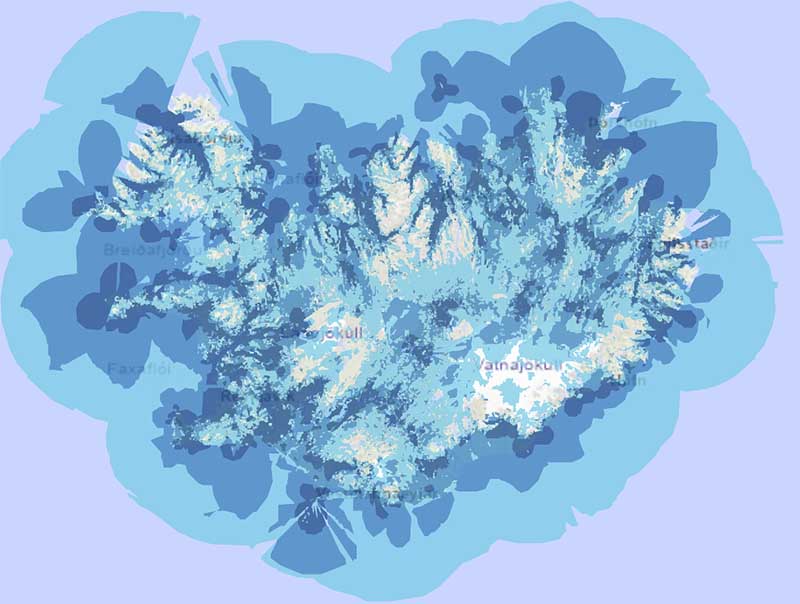
Will you have signal on top of a glacier? Probably not. But you will be surprised by how good the coverage is.
-
Reykjavik & The Golden Circle: 5G/4G LTE is standard. Excellent speeds.
-
The Ring Road (Route 1): Coverage is reliable for 95% of the route. You may find brief dead zones in narrow fjords in the East or North, but they rarely last long.
-
The Westfjords: Coverage is good in towns, but spotty on mountain passes and remote coastal roads.
-
The Highlands (F-Roads): This is where coverage drops. While you will often get a signal on high ground, do not rely on streaming music here. GPS and safety apps are critical here.
Essential Apps for Your Rental Car Journey
Having data is useless if you don't have the right apps. Download these before you leave the Wi-Fi zone of the airport.
-
SafeTravel: The official app of the Icelandic Association for Search and Rescue. It allows you to check-in your location and get alerts about dangerous conditions.
-
Veður (Vedur.is): The Icelandic Met Office app. Never ignore a weather warning in Iceland.
-
Færð & Veður (Road.is): Shows real-time road conditions (green is clear, blue is slippery, red is closed).
-
112 Iceland: An app that lets you send a distress signal with your GPS location to emergency responders with a single tap.
-
Parka: Used to pay for parking in downtown Reykjavik and popular sites like Skaftafell and Geldingadalir.
How to Use Google Maps Offline (Your Backup Plan)
Even with the best SIM card for Iceland travel, technology can fail. Batteries die, and signals drop. We highly recommend downloading offline maps to your phone as a backup.
How to do it:
-
Open the Google Maps app on your phone while on Wi-Fi.
-
Search for "Iceland".
-
Tap the name "Iceland" at the bottom of the screen.
-
Tap the three dots (menu) in the top right corner.
-
Select "Download offline map".
-
Adjust the square to cover the area you are visiting (or the whole country) and hit Download.
This ensures your GPS navigation works even if you have zero bars of signal.
Looking for more advice? Read our guide on 15 Tips for Traveling to Iceland.
Frequently Asked Questions (FAQs)
What is the best SIM card for Iceland travel coverage?
Síminn is widely considered the best provider for coverage, particularly if you are traveling to rural areas, the Westfjords, or the Highlands. Nova and Vodafone also offer excellent service but may have slightly fewer masts in very remote wilderness areas.
Can I buy a SIM card at Keflavik Airport?
Yes. You can buy prepaid SIM cards from the 10-11 convenience store or the Elko electronics shop in the arrivals hall. Duty Free Iceland (open 24/7) also sells them.
How much does portable Wi-Fi cost for an Iceland car rental?
Prices vary, but generally, a portable Wi-Fi unit from Höldur Car Rental costs around 900 ISK per day. This includes 10Gb of data and allows you to connect multiple devices, making it cheaper than roaming fees for non-EU travelers.
Do I need a 4x4 to get mobile signal in the Highlands?
Your car type doesn't affect your signal! However, mobile coverage in the Highlands is spotty. You will often find 4G signal on high ridges and mountain tops, but you may lose connection in valleys. Always travel with a GPS or offline maps in the Highlands and remember you need to book an 4x4 SUV to go there.
Does my EU phone plan work in Iceland?
Yes. Iceland is part of the EEA (European Economic Area). If you have a mobile plan from an EU country, Norway, or Liechtenstein, "Roam Like at Home" rules apply, meaning you can use your domestic data allowance without extra roaming charges (subject to fair use limits).
Is free Wi-Fi common in Iceland?
Yes, free Wi-Fi is very common in hotels, guesthouses, cafes, and gas stations (like N1 and Olís) along the Ring Road. However, you should not rely on it for navigation while driving between towns.
Which apps are essential for driving in Iceland?
You should download SafeTravel (for safety alerts), Veður (for weather), Færð & Veður (Road.is for road conditions), and 112 Iceland (for emergencies).
Does Google Maps work in Iceland?
Yes, Google Maps is highly accurate in Iceland for the Ring Road and paved roads. However, for F-roads (highland tracks), it can sometimes be inaccurate regarding river crossings. Always cross-reference highland routes with Road.is or ask local rangers.
Conclusion: Which Option is Right for You?
Choosing the right connectivity option depends on your travel style:
-
The Family Road Trip: Add the Höldur Mobile Wi-Fi to your rental. It keeps the kids entertained and the driver connected without swapping SIM cards.
-
The Solo Adventurer: Buy a Síminn prepaid card at the airport for maximum safety coverage in remote areas.
-
The Tech Minimalist: Use an eSIM like Airalo for quick data access without the plastic waste.
No matter which option you choose, remember that driving in Iceland requires attention and respect for nature. Use your connection to stay safe, check the weather, and capture the memories of a lifetime.
Ready to hit the road? Check out our wide range of vehicles, from 4x4s for the Highlands to compact cars for the city.